

Deep Dive
Model Context Protocol (MCP)
30.09.2025

Senior Data Scientist
Introduction
This is the second article in our HMS series on the Model Context Protocol (MCP), which provides an in-depth look at its structure and concepts.
We explain the roles of the MCP host, client, and server, demonstrate how functions such as tools and resources are provided, and examine how these components interact in typical workflows. The article also covers the basic protocol primitives, transport mechanisms, and security aspects.
If you haven’t read our first article yet: MCP: Scalable and Standardized LLM Integration for Enterprises
The Roles of Host, Client, and Server in MCP
MCP uses a client-server architecture with three key roles:
- MCP Host:
The application into which one or more LLMs are integrated. This can be a chatbot that delivers LLM-generated responses to users, or an IDE with LLM-based programming assistance.
This component orchestrates MCP functions by hosting and managing components such as LLM instances and MCP clients. The MCP Host interprets and catalogs the available functions of the MCP servers and coordinates the LLMs’ access to the relevant context. - MCP Client:
A lightweight process launched by the MCP Host. Each client maintains a dedicated one-to-one connection to a single MCP server. A client handles low-level protocol communication with its server, discovers available functions at runtime, and manages all interactions between the server and the host. - MCP Server:
A service that provides specialized context to an LLM. It makes functions (tools, resources, and prompts) available in a standardized format. Each server can accept connections from multiple clients and even operate across hosts via the clients.
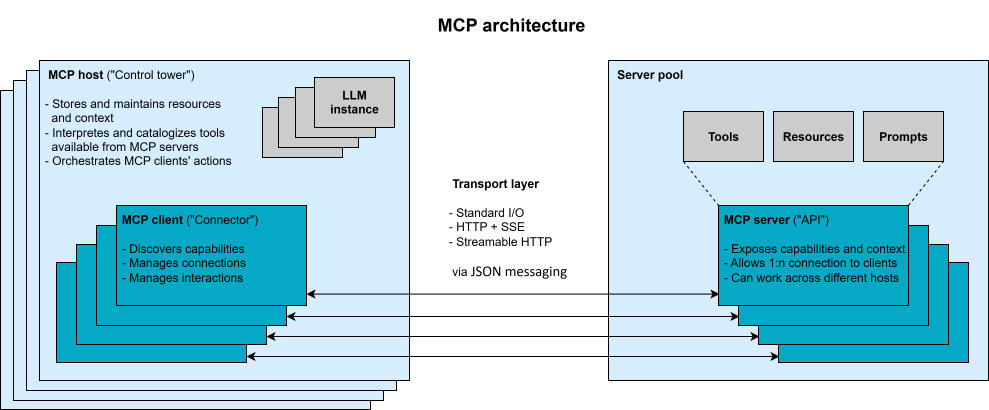
The MCP Host can connect to multiple MCP Servers in parallel, with each server managed by its own client. This modular architecture ensures a clear separation of responsibilities and supports sandboxing and controlled access. For example, the Host can enforce user permissions between the LLM and each server interaction.
At least one LLM instance runs within the MCP host and acts as a consumer of the context. Through the host, the instances can trigger MCP clients to execute tools or access resources and prompts provided by an MCP server. However, the LLM does not have a defined role in the MCP specification and functions as part of the host rather than as a standalone protocol component.
From the perspective of agent-based systems, the tasks of the MCP host and an agent are very similar. Depending on the use case and interpretation, the terms “MCP host” and “agent” can be used synonymously. Alternatively, they can also be viewed as separate components: The host functions as a user-oriented application shell that provides the MCP infrastructure. The agent complements this by encapsulating the application logic and acting as an intelligent orchestrator that interacts with the LLM and controls client communication. This design allows multiple agents to run simultaneously within a single host, with each treated as a separate instance with its own context and resource scope—and they can also collaborate. Regardless of the interpretation, the agent always operates on the host side of the protocol and, like the LLM, does not assume any defined MCP role.
Communication within MCP takes place via a transport layer based on JSON-RPC 2.0. This enables structured messages over stateful connections between clients and servers. MCP supports both local and remote transport mechanisms for MCP servers running either locally or in cloud environments. For local communication, Standard Input/Output (STDIO) is simple and effective. For remote integration, the protocol supports HTTP with Server-Sent Events (SSE) or Streamable HTTP. The latter is recommended for remote connections in the future, but is not yet fully implemented in all currently available MCP Software Development Kits (SDKs). In addition to a rapidly growing number of SDKs from various vendors, Anthropic itself offers official SDKs for various programming languages.
During operation, MCP clients and servers exchange requests, responses, and notifications. Each server declares its available set of functions via a JSON schema. For example, a cloud storage server might offer tools such as “search” or “duplicate_file.” This setup supports a cyclical, dialog-like interaction process: The LLM communicates in natural language but, in the background, invokes tools and accesses resources in a standardized manner—exactly when needed.
We’ll revisit this in a later chapter of this article with a workflow example.
MCP Basics: Resources, Tools, and Prompts
MCP introduces three basic elements (function types) that MCP servers offer and provide:
- Resources:
These are data sources that can be read by MCP clients. The MCP server makes this data available without significant computation so that it can become part of the LLM context. Each resource has a unique Uniform Resource Identifier (URI), such as “file://financial_reports/summary.pdf” for file content or “database://weather/forecasts” for database entries. Clients can query the server’s resources to discover available URIs and retrieve their contents.
Resources are application-driven: The MCP host determines both the timing and the strategy for server usage—for example, through user selection or internal selection algorithms. - Tools:
These are executable functions that can be invoked by MCP clients. Tools enable dynamic operations with external systems, such as a database update query or a command to create a file. Servers declare tools with unique names and input schemas. The client can list the available tools, and the LLM can then invoke them via the MCP host and client. After execution, the server returns the results.
Tools are model-driven: The LLM decides during the reasoning process and based on the context which server tool to invoke—although there are use cases where the user must approve an action. - Input Templates (Prompts):
These are reusable conversation templates provided by MCP clients via MCP servers. Prompts are predefined sequences of instructions with unique names that accept arguments and additional inputs. The client can list the available prompts and request structured prompt content. This approach helps standardize and optimize common LLM tasks, while domain experts can contribute specialized prompts—such as high-quality few-shot examples—that are directly embedded into the workflow.
Prompts are user-controlled: The user decides whether to execute them and can insert placeholders for resources or tool outputs.
A single MCP server can provide any combination of these building blocks—ranging from specialized servers that focus on a single element to monolithic servers that offer a wide range of functionalities.
As soon as an MCP server and an LLM are scheduled to interact automatically, a model-driven building block should be available.
These building blocks are supplemented by additional communication functions that support the exchange between client and server (and vice versa) and enable further use cases:
- Roots:
In some scenarios, it is helpful to specify which files or directories an MCP server is allowed or expected to access. A root refers to a URI, typically a directory path or a file URL. One or more roots can be managed by an MCP client. The server can query the root list to determine where to find relevant resources and to restrict the context. - Sampling:
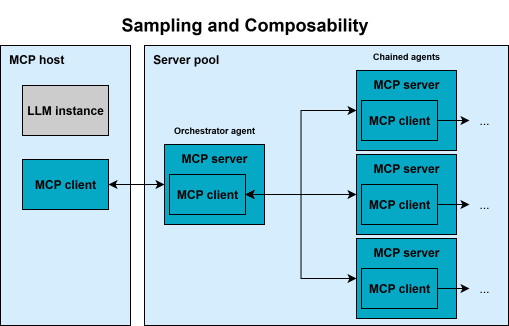
To enable MCP servers to work with the host’s LLMs, MCP offers the sampling feature. This allows servers to send LLM requests via the client. The client retains control over communication and permissions. Servers (especially tools) can thus use an LLM without having to perform any additional configuration themselves—which supports agent-based workflows.
Important: For security and trust reasons, every sampling request should always be reviewed by a human via the MCP host. - Elicitation:
Elicitation is a new feature that enables an MCP server to request specific information from the user via the client. To do this, the host displays a form (based on a JSON schema) that the user can accept, reject, or cancel. In this way, servers can request specific inputs rather than needing everything in advance. However, elicitation must not be used to request sensitive data, and it must be clear to the user which server is making the request. As with sampling, the MCP client remains in control here as well.
Taken together, these basic elements and functions enable MCP to define rich interfaces:
- data, actions, and interactive templates (resources, tools, input templates)
- as well as dynamic behaviors (Roots, Sampling, Elicitation)—all within a standardized JSON-based protocol.
This is complemented by the concept of composability: An MCP client can act as a server itself and vice versa (see figure above). Together with the sampling approach, this enables the chaining of multiple MCP servers, thereby strengthening multi-agent topologies. This composability is part of MCP’s vision for a modular ecosystem.
For more information on the core concepts described and current developments, visit Anthropic’s specification page. Anthropic’s featurematrix provides an overview of clients that support these core concepts.
Typical Workflow: How MCP Is Integrated into Applications
To demonstrate and explain how MCP can be integrated into an application workflow, let’s consider an example RAG (Retrieval Augmented Generation) application that follows the steps and processes outlined below.
When the application starts, it creates multiple MCP clients. Each client initiates a handshake with a corresponding server to exchange information about supported functions and protocol versions. This handshake ensures that both sides are compatible and can communicate effectively with each other.
After initialization, each client sends a discovery request to its connected server to determine which specific features are available. These features may include tools, resources, or input templates. The MCP server responds with a structured list describing each of these elements, and the client forwards this information to the host. The MCP host can then interpret this information and prepare it for use.
Once discovery is complete, the host application translates the available functions into a format suitable for interacting with an LLM. This may involve, for example, parsing tool definitions into JSON schemas for function calls or organizing resources and input templates in a format that the LLM can use during inference.
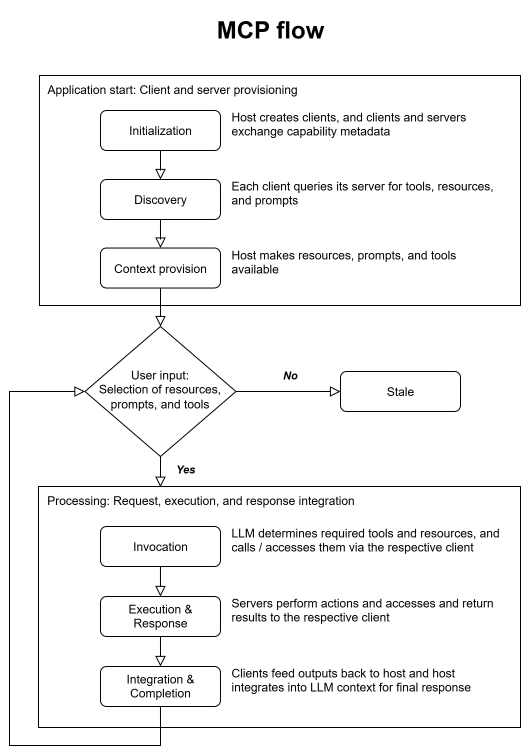
The application is now ready to interact with the user. For example, if a user enters the query “What open issues are there in the HMS GitHub repository?”, the LLM analyzes the query and recognizes that it is necessary to invoke a specific tool or access a resource. It identifies the appropriate function, and the MCP host instructs the corresponding client to send a call request to the server responsible for that tool.
The MCP server receives this request—for example, a “fetch_github_issues” request with the “HMS” parameter—executes the underlying logic (e.g., an API call to GitHub), and processes the result. Once the operation is complete, the server sends the response data back to the MCP client.
The client then forwards this result to the MCP host, which integrates the information into the LLM’s context. Any further processing by the LLM now takes place within this expanded context. Using the updated and relevant data, the LLM generates a response that reflects both its internal reasoning and the newly retrieved external information.
This MCP flow enables the LLM to consistently access up-to-date data, utilize specialized functions as needed, and provide users with well-founded, meaningful responses. The separation between the MCP host, client, and server ensures modularity, scalability, and flexibility—both in the deployment and maintenance of various tools across different environments.
Security Considerations & Best Practices for MCP
Like any powerful new technology, MCP also presents new security challenges that are currently being addressed. Since MCP servers often have privileged access (e.g., API keys, database credentials) or contain sensitive data, they become particularly attractive targets for attacks.
One possible attack scenario is token theft: An attacker who compromises an MCP server could steal OAuth tokens and thereby gain the proverbial “keys to the kingdom”—that is, full access to a user’s emails, files, and cloud services without triggering the usual login warnings. A compromised MCP server could also perform unauthorized actions across all connected accounts. It would also be possible for a manipulated* MCP server to alter its tools after installation: For example, a seemingly harmless “weather” tool could update itself autonomously to exfiltrate data—provided there are no version or integrity checks in place.
Another risk is so-called “Confused Deputy” authorization: If a server performs actions on behalf of the LLM, it must be ensured that this is done with the correct user permissions. The current MCP specification uses OAuth 2.1 for remote authentication. However, it has been determined that parts of the specification may conflict with common enterprise best practices. Anthropic and the community are already working to further develop the specification to strengthen authorization and credential handling.
Furthermore, MCP introduces novel, LLM-specific attack vectors. One example is prompt injection, which becomes even more dangerous due to MCP: If a user (or an attacker) gives the LLM a malicious prompt, the system could be tricked into unintentionally executing commands. Even without malicious intent, such a prompt could trigger unexpected actions—such as the covert addition of an extra user to a cloud account (see related incident).
To mitigate these risks, there are several recommended best practices:
- Least privilege, user consent, and transparency:
MCP hosts and servers should enforce fine-grained permissions. Users (or the host application) must approve every tool execution or data access to see what an LLM intends to do and to limit its scope of action. - Signatures and security checks:
MCP server binaries and code should be cryptographically signed and obtained only from trusted publishers. Security pipelines should be used when building servers. - Sandboxing:
Local servers should run in isolated environments so that they can access only the intended resources. - Monitoring and Audits:
Organizations should monitor MCP traffic for anomalies (unusual tool calls or data queries) and set up alerts for any creeping expansion of the scope of access. - Training & Awareness:
Developers must understand MCP as a new level of abstraction and be aware of the associated risks. MCP servers should only be integrated after a detailed and thorough review. The risk of prompt injections should always be taken into account during implementations.
In response to these challenges, the MCP roadmap calls for the introduction of additional features—including an official registry for locating and centrally managing validated remote servers, governance mechanisms for transparent tracking of standards, and validation tools for test suites to verify compliance. These measures will help the ecosystem mature in terms of security.
Conclusion: Why MCP Is Relevant for Businesses
MCP defines a modular protocol that enables LLM applications to interact with external data, tools, and prompts via a structured host-client-server architecture. Hosts manage context and control execution, clients handle protocol communication, and servers provide the functions. The basic elements of MCP (resources, tools, and input templates) support robust and extensible LLM workflows, while additional features such as sampling and elicitation enable dynamic interactions.
The protocol’s transport is based on JSON-RPC 2.0 with support for local and remote servers. Security remains an active area of development—particularly with regard to token handling, controlling tool invocations, and protection against prompt injections. Recommended best practices include sandboxing, least-privilege access, and audit mechanisms.
Organizations looking to deploy MCP should first experiment in controlled environments before rushing into production. Given the ongoing development, it is important to stay up to date, as new features continuously make the protocol more powerful and robust. MCP deserves special attention from decision-makers and architects, as it addresses real-world challenges in the adoption of LLMs.
By building MCP-compatible systems, companies can ensure that their LLM applications remain flexible and future-proof. In short: MCP is set to become the backbone of the next generation of LLM-based systems. As the ecosystem matures, MCP is evolving into the foundation for secure, modular, and agent-based applications—in both on-premises and cloud environments.
In the next article in the HMS series on MCP, we’ll take a reality check: You’ll learn how we at HMS are already using MCP—to optimize processes, implement or expand customer applications, and ultimately deliver smarter services. You can look forward to practical insights, code examples, and even a look at our own code migration tool as well as some customer projects.
Discover successful implementations in our case studies.

We're happy to answer your questions.